Mesh router recommendations

  • Thread starter Thread starter User.45
  • Start date Start date
🤖 AI Thread Summary Generated 05 Jun 2026 · 37 posts

Key Points & Conclusions

WiFi 6 recommended: Multiple users advised getting WiFi 6 rather than older generations for better performance and future-proofing

Popular mesh systems discussed: Google Wifi, Netgear Orbi, Eero, TP-Link, Synology, Taotronics, and Ubiquiti UniFi all received mentions with generally positive feedback

Netgear Orbi and Ubiquiti UniFi favored: Several experienced users praised these systems for reliability and performance; UniFi particularly recommended for those with wired backhaul infrastructure

Wired backhaul superior: Multiple users emphasized that wired ethernet connections between mesh nodes significantly outperform wireless backhaul

Home wiring valuable: Users with pre-installed ethernet cabling throughout their homes reported major advantages in network stability and speed

Security concerns raised: Discussion of data privacy with various manufacturers (Google, Chinese companies, NSA) with no clear consensus on preferred option

Integration challenges: Some users experienced device compatibility issues (smart switches, printers) requiring manual IP configuration and troubleshooting

Build quality matters: Positive feedback on packaging and construction quality from UniFi equipment

Areas of Disagreement

Eero performance: One user reported Eero "over-promised and under-delivered" while another user was satisfied with their Eero 7 purchase

Manufacturer trust: Debate over privacy implications of different manufacturers, with disagreement about whether US or Chinese oversight is preferable

Budget priorities: Difference of opinion on whether immediate investment in 2.5Gbps switches was necessary versus waiting for future upgrades

No major technical disagreements emerged; most debates centered on personal preferences and risk tolerance.

U

User.45

Guest
Does anybody have a mesh router? Any advantage? Should I consider WIFI 6? What security features should I look for?!
 
I have a Google Wifi 3-pack setup. I find it to be quite good. Fairly easy to set up, and if you position your various routers correctly, it can cover a massive amount of space.

The only complaint I have is that Google's wifi app is rather barebones on settings, and you have to use it exclusively. I'd prefer a more classical setup that lets you log into your routers via web browser.
 
I setup an Eero system for somebody - I felt it over-promised and under-delivered. I recently setup NetGear Orbi for another person and I thought it worked very well. You should get WiFi 6 for sure; do not get last-gen WiFi. I went to a seminar before the pandemic and the number of advances made in WiFi 6 was impressive.
 
Back when I was shopping, er, I guess a year ago, I was shopping the Orbi products from Netgear, almost pulled the trigger, then just wound up with a second Apple Airport Extreme (6th Gen) for downstairs as an AP. We have a cable modem and AE #1 (in router mode) and a Homerun HD, in the gear closet upstairs, with a couple of ethernet runs (ATV/AV is wired in the bedroom), including a drop down to the second floor to a switch on the AV rack (everything on the rack is ethernet), and the AE #2 connected to that switch (sitting up on the mantel), running in "bridge mode", so you can sort of roam around with coverage all over (including the deck and driveway and most of the yard). So the iOS devices are all on WiFi, so are the laptops, etc.

anyway ...

If I were buying today, I'd seriously look into the Nest product line from Google.

 
I'm a little late to the party here but this is the recommendation I'd give you. Taotronics. That's right. This obscure, new-comer has the best mash router system I've used to date. Replaced the Deco 5 (all five of them) with just two Taotronics. Speed, coverage, reliability and the bandwidth are simply amazing. It has fantastic features, including AI based optimization of the network. It actually works. I am truly impressed.

 
I'm a little late to the party here but this is the recommendation I'd give you. Taotronics. That's right. This obscure, new-comer has the best mash router system I've used to date. Replaced the Deco 5 (all five of them) with just two Taotronics. Speed, coverage, reliability and the bandwidth are simply amazing. It has fantastic features, including AI based optimization of the network. It actually works. I am truly impressed.

It is my paranoia, but I'm also looking for something made in the USA. I'm only willing to provide a backdoor for 1 government, 2 is a little too much:/
 
Personally I would rather let the Chinese spy on me than the US, or Google. :D
My preferences are set by the level of accountability:

NSA > Google > CCP

I don't think there's much you can do about Google.
 
Google hangs around like crabs in a brothel. No matter how much you scratch and shave...
I believe that people should have the freedom to choose their preferred spying party.

Unfortunately I cannot help with any recommendations, because I've only been looking to dive into this solution for my wifi issues at home.

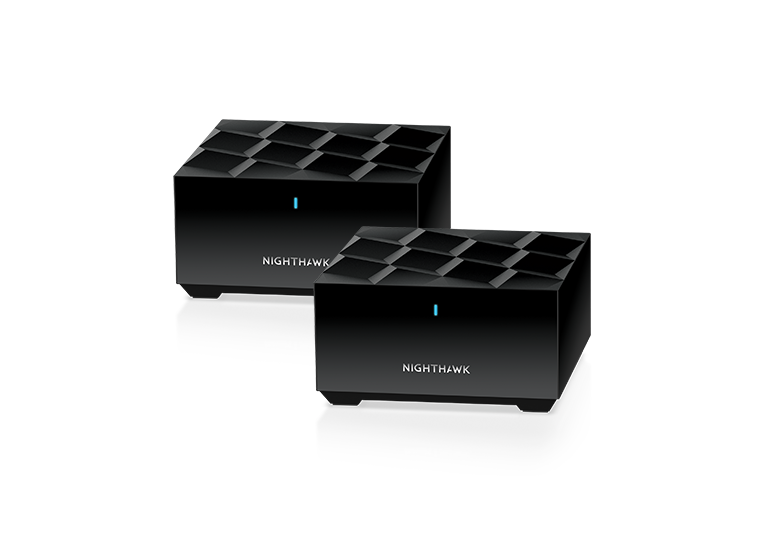
The one thing that makes me weary of google hardware is that they have the attention span of a squirrel when it comes to products, so I cannot rely on them for long term support and the ability to buy any more in a few years, if the need arises. I am currently looking at Netgear and stuff like the Orbi wifi 6 and the Nighthawk range.

Nighthawk looks pretty good:
 
I spent half a day yesterday diagnosing why a somewhat random collection of devices in the house didn’t work: the wired apple tvs (2 of them), a handful of smart light switches (leviton and kasa), a wired laptop in my home office, to start with.

I noticed that the synology mesh point in my bedroom was showing a red light, so I power-cycled it, and that brought the light switches back on line. But the other stuff still didn’t work. Since the things that I knew to be malfunctioning were all wired, my first thought was a bad switch upstairs (I didn’t know about the downstairs apple tv at that point) - i’ve had to replace the 16 port switch a few times. I swapped it and it didn’t help. I went downstairs and saw that the apple tv down there wasn’t working, so my next thought was the router or the switch downstairs. I plugged my laptop into a spare router port and saw that I was “self-assigned” a WAN address instead of a LAN address. Weird. Power cycled the router and cable modem. No help.

Replaced the router with a spare, and my laptop got a good IP address. Ok, I thought. It will be a pain in the ass because I will have to update the firmware on the old router/mesh points (5 of them!) to the new version, then factory reset the mesh points so I can reassign them to the new router.

But before going through that hassle, I moved the 2 LAN-side ethernet cables from the old router and moved them to the new one to make sure everything worked.

Nope.

And then I noticed my laptop had a WAN IP address again.

WTF.

I start walking around the house and notice another mesh point throwing a red light. I turn it off.

Then it occurs to me - years ago I saw crazy stuff happen when one particular wired mesh point went crazy. I went and shut it off. Now everything worked.

Ugh.

I put the old router back in place and wired it all up, shut off all the mesh points, turned them on one-by-one (as is my custom - the order matters as some are wired and some aren’t), and now everything works.

Anyway, all of that is prelude to me deciding it’s time to upgrade this ancient system. I’ve read reviews and analysis of all the major systems, and I’m leaning toward getting a Unifi dream router 7 and then some number of unifi express 7’s as access points/wireless bridges, and maybe a couple of wall mounted 7 access points.

I’m leaning toward the express 7’s since I need bridges in a couple rooms, and the only way to do that with access points is the “in wall” one, and I’d also need a PoE+ injector, and I am not going to be putting it in my wall anyway. It seems that unlike previous “express” generations, the express 7 is pretty capable.

My only experience with unifi is for a case, where I had some of their equipment set up to analyze how roaming worked.

But, anyway, curious if anyone has any thoughts? Is there some other brand that makes sense instead? Is there some pitfall I’m missing of using express 7’s as APs?
 
i have heard a lot of good things about Ubiquiti gear, and if you get into the eco system the Unifi travel router looks promising to have.
 
At the new place, I just setup Eero 7s, they rarely go on sale, but I scored a good deal on Lowes for $279 (free ship) for a 3-pack.

We're on Spectrum 1Gb service, had their modem and router for a week, when we got back down here (still bouncing between locations SA <> DTO), I pulled the Spectrum router, setup the Eero, super nice app, 30 second config, no need for their software or anything. We have a full ethernet deployment here in DTO, so I got a little $8 tester to document the ports (like the kitchen/living area has 4), picked up a little TP 1Gb 4-port switch, the wiring panel has power, so shoved it in. :D Wired backhaul from the office (3rd floor) and the daughter digs (1st floor), fantastic coverage, the primary is on the 2nd in the entertainment console (though might move it to the office, along with the Mac Mini/drives).
 
At the new place, I just setup Eero 7s, they rarely go on sale, but I scored a good deal on Lowes for $279 (free ship) for a 3-pack.

We're on Spectrum 1Gb service, had their modem and router for a week, when we got back down here (still bouncing between locations SA <> DTO), I pulled the Spectrum router, setup the Eero, super nice app, 30 second config, no need for their software or anything. We have a full ethernet deployment here in DTO, so I got a little $8 tester to document the ports (like the kitchen/living area has 4), picked up a little TP 1Gb 4-port switch, the wiring panel has power, so shoved it in. :D Wired backhaul from the office (3rd floor) and the daughter digs (1st floor), fantastic coverage, the primary is on the 2nd in the entertainment console (though might move it to the office, along with the Mac Mini/drives).
The Eero 7's have 2 x 5Gbps Ethernet ports - you should have picked up a cheap 2.5Gbps switch to increase your backbone speed. :) (presuming that you don't have Cat-6 cabling - in which case, you may actually benefit from a 10Gbps, if it'll support the 5Gbps connections). :)
 
The Eero 7's have 2 x 5Gbps Ethernet ports - you should have picked up a cheap 2.5Gbps switch to increase your backbone speed. :) (presuming that you don't have Cat-6 cabling - in which case, you may actually benefit from a 10Gbps, if it'll support the 5Gbps connections). :)

They have 2 x 2.5Gb ports :) These are the 7 not the Pro 7.

With 1Gb (internet service) didn't see the need in the short term (since there's really no internal device-to-device traffic) and if we do upgrade to 2Gb in the future, the $12 on the switch is pretty trivial (to replace).
 
They have 2 x 2.5Gb ports :) These are the 7 not the Pro 7.

With 1Gb (internet service) didn't see the need in the short term (since there's really no internal device-to-device traffic) and if we do upgrade to 2Gb in the future, the $12 on the switch is pretty trivial (to replace).
Yep - if you had a home NAS, then it would make sense to want more local bandwidth. :)
 
Well, I ordered the dream router and a couple of expresses so I can test it out with one in wireless and the other in wired backhaul configurations. If it works out I can buy another couple expresses or APs if needed to fill in different locations. The main issue is I have something like 90 or 100 devices on the network, so stability will be important. I think some of the problems I am having is that my existing synology routers begin to get wobbly once you hit around 100 clients.
 
Well, I ordered the dream router and a couple of expresses so I can test it out with one in wireless and the other in wired backhaul configurations. If it works out I can buy another couple expresses or APs if needed to fill in different locations. The main issue is I have something like 90 or 100 devices on the network, so stability will be important. I think some of the problems I am having is that my existing synology routers begin to get wobbly once you hit around 100 clients.
I would recommend getting a cheap, used x86-64 (something like Intel Gen 6 or later) SFF desktop with 8GB of RAM and SATA SSD, and install OpenWrt on it to replace your Synology router. Can easily upgrade to 10gbe with just a relatively cheap (but runs hots) PCIe card if you ever need it if router is acting as file server as well.
 
I would recommend getting a cheap, used x86-64 (something like Intel Gen 6 or later) SFF desktop with 8GB of RAM and SATA SSD, and install OpenWrt on it to replace your Synology router. Can easily upgrade to 10gbe with just a relatively cheap (but runs hots) PCIe card if you ever need it if router is acting as file server as well.
I need a mesh system for this house. The location where the cable modem is is also a cabinet where I can’t realistically fit a PC in there, let alone keep it running cool.

Right now I have the cable modem and main router in that cabinet, along with a switch which drives some stuff nearby, but also drives two cat 6 cables upstairs. I have switches on the end of those cat 6’s which drives various stuff plus one AP each. Then I have three other AP’s with wireless backhaul on the opposite end of the house, one of which drives a powerline ethernet thingy into the garage, where I have an old Airport which drives a different wifi network for use by the cars, various ring cameras, sprinkler system, etc.

I figure I will need fewer APs now as technology has improved, but we’ll see. I may also be able to replace the powerline networking with a Unifi Device Bridge in the garage (I’d rather keep all that stuff on a separate network and I want to avoid two wifi hops, so we’ll see).
 
Back
Top